|
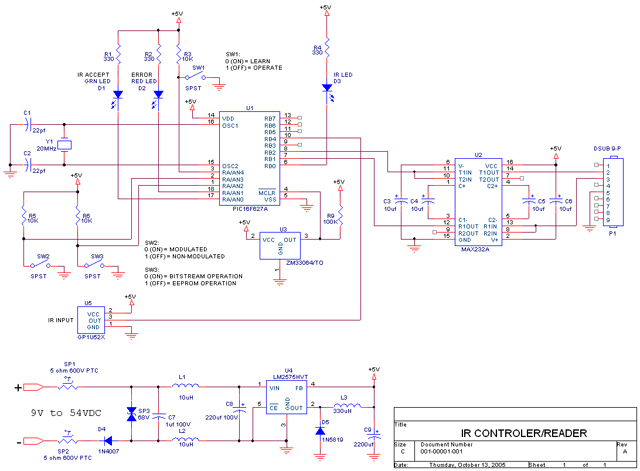
I used the Microchip PIC16F627A for this project. Mainly because it had it's own USART (RS232 port) and many level sensitive interrupts as well as onboard EEPROM to store all the commands. This solution uses only two chips. The processor and a MAX232 for RS232 level translation. Zipped file of all schematic files. Word document file containing schematic as a picture. JPEG of schematic. Source code Listing and Hex File I first tried using Microship's design database for application examples. I found their application AN555 which was intended for PIC processors (particularily the PIC16X series) without a USART in it. I thought I'd save myself the need for a USART, but after copying the code to the letter, to the syntax, to the period, and using it with a PIC16F84, it wouldn't work worth a ****. So I abandoned the idea of having to do it all in software. Because I first felt I needed a lot of EEPROM, I then found their application AN515 which was as well written as a Mickey Spalain novel. I thought I hit the motherlode with their application AN657 entilted "Decoding an Infrared Remote Using a PIC16C5X Microcontroller". But it was so entrenched with using two seven segment displays and not really showing how an IR signal works, or clear areas of code to use, it was a total loss to cut and paste. I actually tried it, but got very little success. Aren't there any good software application engineers there? So I had to write from scratch something highly flexible and usable. I've almost considered offering it to Microchip as an app, but we'll see. Luckily for you, it's presented here. I chose the PIC16F627A as mentioned, because I could hook up an IR receiver to any of the top 4 MSB bits of PORT B and any transition would cause an interrupt. This was great for catching IR code transmissions. Plus, the RS232 port (USART) was perfect for communicating with the computer COM1 port. Plus, it has 3 timers in it. One was used for timing the IR transitions, and another was used for creating the 40kHz signal that acts as a carrier on IR signals. Plenty of code space, RAM, EEPROM and all kinds of bells and whistles on this chip and it's only $1.53 quantites of 1, from either Mouser or Digikey. You can't beat that! Now for the invaluable information!!! I has all kinds of trouble with the interrupts and exchanged many emails with one of Microchip's trouble shooters. Turns out, Microchip enables everything! There's a set of comparitors, an on chip reference voltage, external interrupt pins, 3 timers, a PWM section, the USART, an internal reset and oscillator. And although it's not clear in the data sheet, they automatically enable everything as if everyone would use it all, rather than just letting you enable what you need. Totally counter intuitive! Even their expert said replied to my "why is this crazy thing like this" question said: "I can't answer the "marketing" questions of why certain peripherals are enabled upon power-up, but I agree with you." So avoid wondering why everything is tripping (I thought it was my reset circuitry) by disabling everything at start up. I just saved you a day or two! Ok, so have some fun. I hope this project is something you can get great E2 communication cut and pastes from, as well as intelligent interrupt practices for catching IR codes and software filtering IR noise. Pluse clear RS232 communication subroutines. Have fun! |